---
updatedAt: 2026-10-20T19:59:02.000Z
agentTools:
projectIndex: https://docs.sensible.so/llms.txt
---
# Linearize
Break multi-column or block-layout document pages into coordinate-based blocks.
**Note:** If you're familiar with Sensible, this advanced topic is for you.
Use this preprocessor for documents containing columns or other blocks of of text. This preprocessor is an advanced alternative to the [Multicolumn](https://docs.sensible.so/docs/multicolumn) preprocessor.
Breaks pages into an array of coordinate-based blocks, before [sorting lines](https://docs.sensible.so/docs/lines#line-sorting).
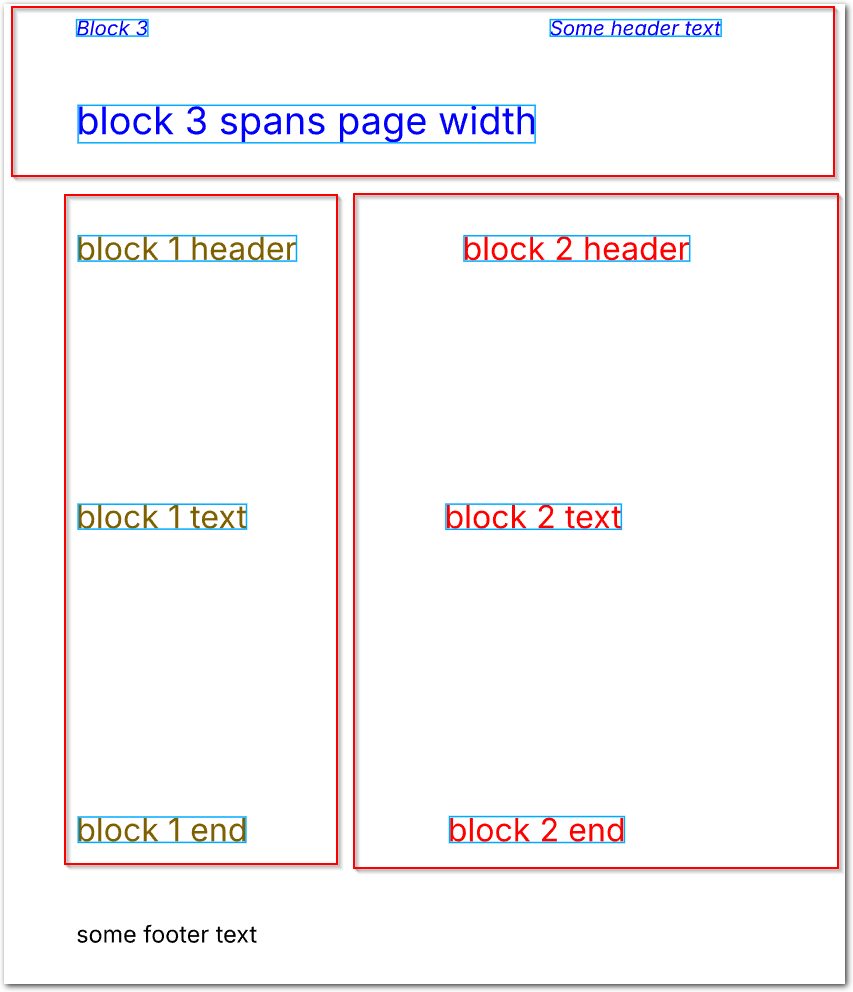
For example, in the following image, you can configure Sensible to sort block 3 after blocks 1 and 2, by specifying block 3 last in an array of blocks:
[**Parameters**](https://docs.sensible.so/docs/linearize#parameters)\
[**Examples**](https://docs.sensible.so/docs/linearize#examples)\
[**Notes**](https://docs.sensible.so/docs/linearize#notes)
# Parameters
| key | value | description |
| ---------------------- | ------------------------------------------------------------------------------------- | ---------------------------------------------------------------------------------------------------------------------------------------------------------------------------------------------------------------------------------------------------------------------------------------------------------------------------------------------------------------------------------------------------------------------------------------------------------------------------------------------------------------------------------------------------------------------------------------------------------------------------------------------------------------------------------------------------------------------------------------------------------------------------------------------------------------------------------------------------------------------------------------------------------- |
| type (**required**) | `linearize` | Recognizes multi-column or block layouts in documents. |
| match
or
range | [Match](https://docs.sensible.so/docs/match) object or array of Match objects
or
Range object | Specifies the matching pages or repeating document ranges ("sections") in which to run this preprocessor.
`match`: Sensible runs this preprocessor on each page containing the matched text.
`range`: Sensible runs this preprocessor in the specified repeating document ranges. For information about this option's parameters, see the [Range](https://docs.sensible.so/docs/sections#range-parameters) parameters for horizontal sections. For an example, see [Example 2](https://docs.sensible.so/docs/linearize#example-2). |
| blocks (**required**) | array of objects | Specifies an array of blocks. Each rectangular block object in the array has the following parameters:
`minX`: default: 0
Specifies the left boundary of the block, in inches from the left edge of the page.
`maxX`: default: page's width in inches
Specifies the right boundary of the block, in inches from the left edge of the page.
`minY`: default: 0
Specifies the top boundary of the block, in inches from the top edge of the page.
`maxY`: default: page's height in inches
Specifies the bottom boundary of the block, in inches from the top edge of the page.
To visually determine the inch coordinates, click a point in the document in the SenseML editor, then drag to display inch dimensions. Any lines that fall partially or completely outside a block are excluded from the preprocessor and are unavailable for SenseML queries. |
# Examples
## Example 1
The following example shows sorting a page's lines into three blocks.
**Config**
```json
{
"preprocessors": [
{
"type": "linearize",
/* run this preprocessor on all pages containing the match*/
"match": "some header text",
"blocks": [
{
/* block 1 */
"minX": 1,
"maxX": 4.4,
"minY": 2.5,
"maxY": 8.5
},
{
/* block 2 */
"minX": 4.5,
"minY": 2.5,
"maxY": 8.5
},
{
/* block 3: top of page, includes header text */
"maxY": 2.4
}
]
}
],
"fields": [
{
/* outputs all lines of the document to check block order.
Note footer text is excluded since no block coordinates include it, and is unavailable to SenseML queries */
"id": "all_lines_in_doc",
"method": {
"id": "documentRange",
"includeAnchor": true
},
"anchor": {
"match": {
"type": "first"
}
}
}
]
}
```
**Example document**\
The following image shows the example document used with this example config:

| Example document | [Download link](https://raw.githubusercontent.com/sensible-hq/sensible-docs/v0/assets/pdfs/linearize_1.pdf) |
| ---------------- | ----------------------------------------------------------------------------------------------------------- |
**Output**
```json
{
"all_lines_in_doc": {
"type": "string",
"value": "block 1 header block 1 text block 1 end block 2 header block 2 text block 2 end Some header text Block 3 block 3 spans page width"
}
}
```
## Example 2
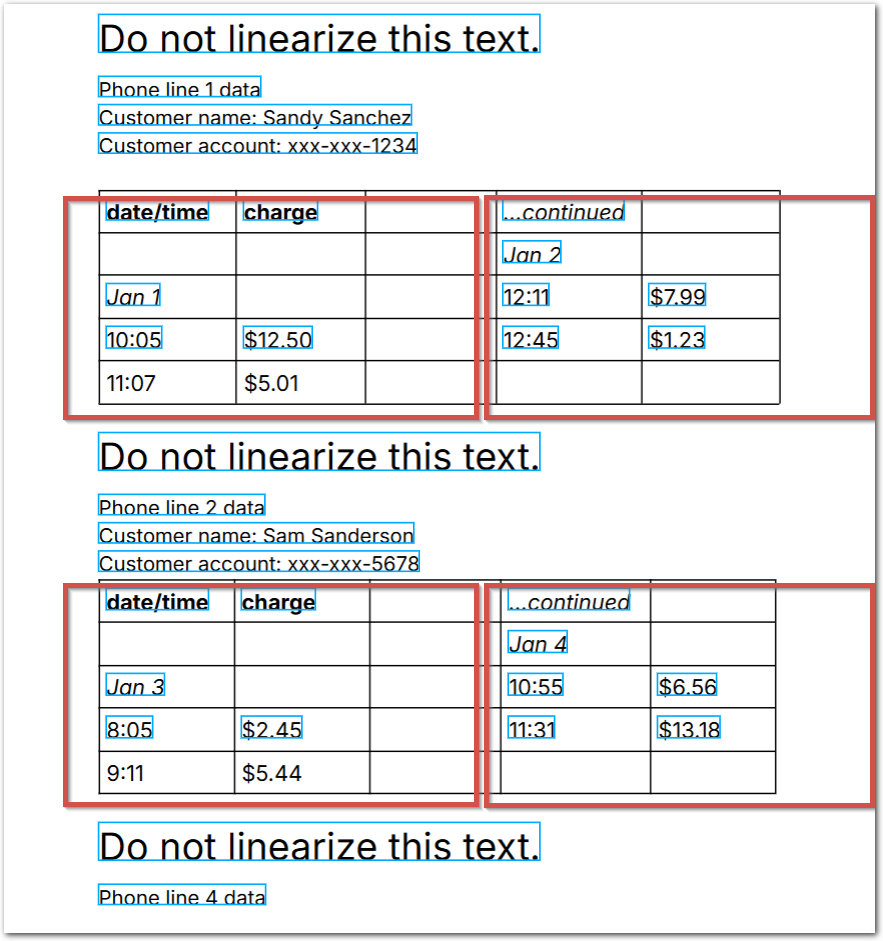
The following example shows sorting lines in "sections", or repeating ranges containing blocks.
**Config**
```json
{
"preprocessors": [
{
"type": "linearize",
/* linearize columns in repeating ranges ("sections") */
"range": {
/* start creating blocks before each instance of "date" */
"anchor": "date",
/* stop creating blocks after each instance of "do not" */
"stop": "do not",
/* offset the stop up the page to exclude "do not" from the blocks */
"stopOffsetY": -0.5
},
/* define two columnar blocks in the repeating ranges
so that col 1 text precedes col 2 text
*/
"blocks": [
{
"minX": 0.5,
"maxX": 4.2
},
{
/* col 2 starts at 4.21" from left edge of page and extends to width of page */
"minX": 4.21
}
]
}
],
"fields": [
{
/* Thanks to the preprocessor, Sensible outputs dates in chronological order. Otherwise, Sensible would output:
jan 2, jan 1, jan 4, jan 3, jan 6, jan 5 */
"id": "dates_chronological_order",
"match": "all",
"anchor": "jan",
"method": {
"id": "passthrough"
}
},
{
/* output all lines in doc to check lines were sorted in blocks */
"id": "all_lines_in_doc",
"method": {
"id": "documentRange",
"includeAnchor": true
},
"anchor": {
"match": {
"type": "first"
}
}
}
]
}
```
**Example document**\
The following image shows the example document used with this example config:
| Example document | [Download link](https://raw.githubusercontent.com/sensible-hq/sensible-docs/v0/assets/pdfs/linearize_2.pdf) |
| ---------------- | ----------------------------------------------------------------------------------------------------------- |
**Output**
```json
{
"dates_chronological_order": [
{
"type": "string",
"value": "Jan 1"
},
{
"type": "string",
"value": "Jan 2"
},
{
"type": "string",
"value": "Jan 3"
},
{
"type": "string",
"value": "Jan 4"
},
{
"type": "string",
"value": "Jan 5"
},
{
"type": "string",
"value": "Jan 6"
}
],
"all_lines_in_doc": {
"type": "string",
"value": "Do not linearize this text. Phone line 1 data Customer name: Sandy Sanchez Customer account: xxx-xxx-1234 date/time charge Jan 1 1005 $12.50 ...continued Jan 2 1211 $7.99 1245 $1.23 Do not linearize this text. Phone line 2 data Customer name: Sam Sanderson Customer account: xxx-xxx-5678 date/time charge Jan 3 805 $2.45 ...continued Jan 4 1055 $6.56 1131 $13.18 Do not linearize this text. Phone line 4 data Customer name: Salma al Saad Customer account: xxx-xxx-9123 date/time charge Jan 5 1105 $2.34 1116 $4.55 ...continued Jan 6 1204 $9.99 1255 $1.98"
}
}
```