---
updatedAt: 2026-10-20T19:59:02.000Z
agentTools:
projectIndex: https://docs.sensible.so/llms.txt
---
# Zip
Combine tables, arrays, and sections into rows using source field IDs, with regex support.
Zips tables into rows, or zips tables, arrays, and sections.
# Parameters
The following parameters are in the computed field's [global Method](https://docs.sensible.so/docs/computed-field-methods#parameters) parameter:
| key | value | description |
| :-------------------------- | :--------------------------------------- | :--------------------------------------------------------------------------------------------------------------------------------------------------------------------------------------------------------------------------------------------------------------------------------------------------------------------------------------------------------------------------------------------------------------------------------- |
| id (**required**) | `zip` | This method returns a section group. For more information, see notes in succeeding table. |
| source\_ids (**required**) | array of field IDs in the current config | The id of the fields to zip.
You can use a JavaScript-flavored regular expression to specify all field IDs that contain a pattern. For example, to specify all the field IDs containing the text `wage` extracted from a W-2 form, you can write `"source_ids": { "pattern": ".*wage.*" }`. For more information and an example, see [Example: Chain prompts with regex](https://docs.sensible.so/docs/query-group#example-chain-prompts-with-regex). |
See the following table for information about the Zip method's output:
| source ids | output | notes |
| --------------------------------------------------- | --------------------------------------------------------------- | ------------------------------------------------------------------------------------------------------------------------------------------------------------------------------------------------------------------------------------------------------------------------------------------------------------------------------------------------------------------------------------------------------------------------------------------------------------------------------------------------------------------------------------------------------------------------------------------------------------------------------------------------------------------------------------------------------------------------------------------------------------------------------------------------------------------------------------------------------------------------------------------------------ |
| arrays | section group containing zipped arrays | For each element in each array, Sensible adds the element identified by the field ID to a section. As an example with simplified syntax,
`"product_color":["blue", "red"]`
and
`"product_id": [123, 456]`
zip to
`"zipped_products":[ {"product_color": "blue", "product_id": 123}, {"product_color": "red", "product_id": 456} ]`.
Examples of source fields that output arrays include those with `"match": "allWithNull"` or `"type": "name"` configured.
If the source arrays are of different lengths, Sensible appends `null` values for the shorter of the two arrays in the zipped output, up to the length of the longer array.
Avoid using `"match":"all"` with the Zip computed field method. This option strips out null array elements and can result in source arrays of unpredictably different lengths.
For a full example, see Example 1. |
| one [table](https://docs.sensible.so/docs/table-methods) | section group containing rows | Sensible zips the columns in a table into row objects. As an example with simplified syntax:
`{"source_table":{"columns":[`
`{"id":"car_model","values":["Camry","CR-V"]},`
`{"id":"car_year","values":[2010,2015]}]}}`
zips to:
`{"zipped_table":[{"car_model":"Camry","car_year":2010},{"car_model":"CR-V","car_year":2015}]}`
For information about how Sensible handles fields that return table arrays, see the Notes section.
For a full example, see Example 2. |
| tables | section group containing merged rows | For an example, see Example 3. For information about how Sensible handles fields that return table arrays, see the Notes section. |
| [section](https://docs.sensible.so/docs/sections) groups | section group containing merged sections | For an example, see [Zip sections example](https://docs.sensible.so/docs/sections-example-zip). |
| mixed input:
tables, section groups, and arrays | section group containing merged rows, sections, and array items | For an example, see Example 4. For information about how Sensible handles fields that return table arrays, see the Notes section. |
# Examples
## Example 1: All With Null zip
The following example shows using `"match":"allWithNull"` as an alternative to [sections](https://docs.sensible.so/docs/sections) to return parallel arrays of phones and last names.
**Note:** Avoid using `"match":"all"` with the Zip computed field method. This option strips out null array elements and can result in source arrays of unpredictably different lengths.
**Config**
```json
{
"preprocessors": [
{
"type": "splitLines",
"minSpaces": 3
}
],
"fields": [
{
/* using `allWithNull` outputs a 5-element array
with one null element (phone for Badawi).
This is preferable to using `all`, which would strip
out a null and output a 4-element array, resulting in
erroneous phone and name pairs
starting with the array element "Badawi */
"id": "phone_number",
"match": "allWithNull",
"anchor": {
"match": {
"type": "startsWith",
"text": "phone number"
}
},
"method": {
"id": "row"
}
},
{
"id": "last_name",
"match": "allWithNull",
"anchor": {
"match": {
"type": "startsWith",
"text": "claimant last name"
}
},
"method": {
"id": "label",
"position": "right"
}
}
],
"computed_fields": [
{
"id": "name_and_phone",
"method": {
"id": "zip",
"source_ids": [
"phone_number",
"last_name"
]
}
},
{
"id": "hide_unzipped_fields",
"method": {
"id": "suppressOutput",
"source_ids": [
"phone_number",
"last_name"
]
}
}
]
}
```
**Example document**\
The following image shows the example document used with this example config:
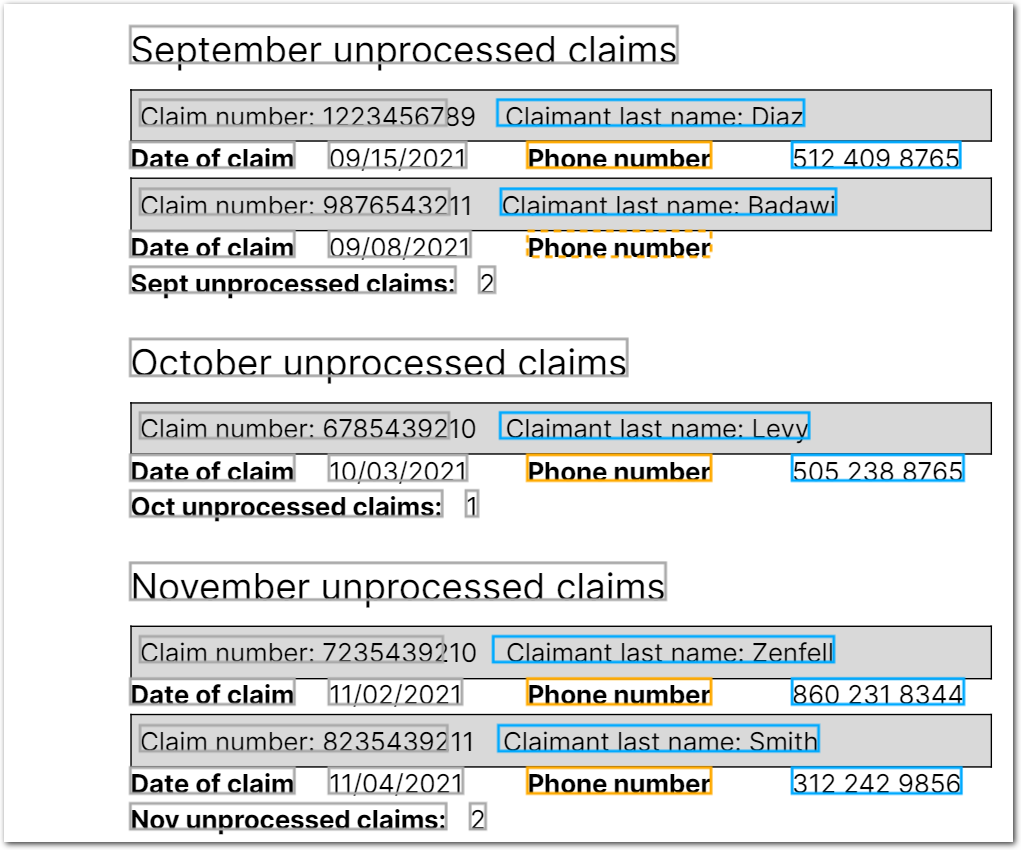
| Example document | [Download link](https://raw.githubusercontent.com/sensible-hq/sensible-docs/v0/assets/pdfs/all_with_null.pdf) |
| ---------------- | ------------------------------------------------------------------------------------------------------------- |
**Output**
```json
{
"name_and_phone": [
{
"phone_number": {
"type": "string",
"value": "512 409 8765"
},
"last_name": {
"type": "string",
"value": ": Diaz"
}
},
{
"phone_number": null,
"last_name": {
"type": "string",
"value": ": Badawi"
}
},
{
"phone_number": {
"type": "string",
"value": "505 238 8765"
},
"last_name": {
"type": "string",
"value": ": Levy"
}
},
{
"phone_number": {
"type": "string",
"value": "860 231 8344"
},
"last_name": {
"type": "string",
"value": ": Zenfell"
}
},
{
"phone_number": {
"type": "string",
"value": "312 242 9856"
},
"last_name": {
"type": "string",
"value": ": Smith"
}
}
]
}
```
## Example 2: Zip table
The following example shows using the Zip method to transform each row from a table of vehicles into a vehicle object.
Notes:
* In order to filter out all column headings, the config specifies `"type": "number"` and `"isRequired": true` for the column `col3_year_made` .
* To improve performance, the config specifies a Stop parameter. This ensures Sensible restricts table recognition to the relevant page area.
**Config**
```json
{
"fields": [
{
"id": "_insured_vehicles_table",
"anchor": "insured vehicles",
"type": "table",
"method": {
"id": "fixedTable",
"columnCount": 4,
"columns": [
{
"id": "col2_model",
"index": 1
},
{
"id": "col3_year_made",
"index": 2,
"type": "number",
"isRequired": true
}
],
"stop": {
"type": "startsWith",
"text": "please"
}
}
}
],
"computed_fields": [
{
"id": "computed_insured_vehicles",
"method": {
"id": "zip",
"source_ids": [
"_insured_vehicles_table"
]
}
}
]
}
```
**Example document**
The following image shows the example document used with this example config:
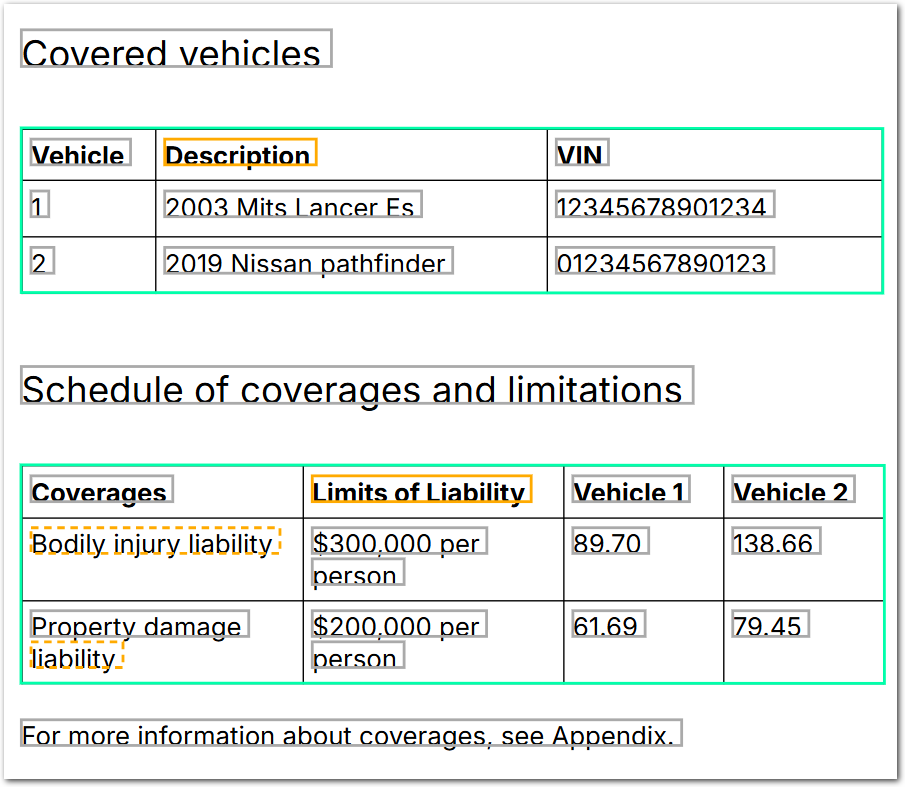
| Example document | [Download link](https://raw.githubusercontent.com/sensible-hq/sensible-docs/v0/assets/pdfs/zip_tables.pdf) |
| ---------------- | ---------------------------------------------------------------------------------------------------------- |
**Output**
```json
{
"_insured_vehicles_table": {
"columns": [
{
"id": "col2_model",
"values": [
{
"value": "Camry",
"type": "string"
},
{
"value": "CR-V",
"type": "string"
},
{
"value": "Golf",
"type": "string"
}
]
},
{
"id": "col3_year_made",
"values": [
{
"source": "2010",
"value": 2010,
"type": "number"
},
{
"source": "2015",
"value": 2015,
"type": "number"
},
{
"source": "2020",
"value": 2020,
"type": "number"
}
]
}
],
"title": {
"type": "string",
"value": "Insured vehicles"
},
"footer": {
"type": "string",
"value": "Please see your policy documents for details."
}
},
"computed_insured_vehicles": [
{
"col2_model": {
"value": "Camry",
"type": "string"
},
"col3_year_made": {
"source": "2010",
"value": 2010,
"type": "number"
}
},
{
"col2_model": {
"value": "CR-V",
"type": "string"
},
"col3_year_made": {
"source": "2015",
"value": 2015,
"type": "number"
}
},
{
"col2_model": {
"value": "Golf",
"type": "string"
},
"col3_year_made": {
"source": "2020",
"value": 2020,
"type": "number"
}
}
]
}
```
## Example 3: Zip tables
**Config**
```json
{
"fields": [
{
"id": "table_1",
"anchor": "description",
"method": {
"id": "fixedTable",
"columnCount": 3,
"startOnRow": 1,
"columns": [
{
"id": "vehicle_num",
"index": 0
},
{
"id": "description",
"index": 1
},
],
"stop": "schedule"
}
},
{
"id": "table_2",
"anchor": "liability",
"method": {
"id": "fixedTable",
"columnCount": 4,
"startOnRow": 1,
"columns": [
{
"id": "coverage",
"index": 0
},
{
"id": "vehicle_1",
"index": 2
},
{
"id": "vehicle_2",
"index": 3
},
],
"stop": "see"
}
},
{
"id": "zip",
"method": {
"id": "zip",
"source_ids": [
"table_1",
"table_2"
]
}
}
]
}
```
**Example document**\
The following image shows the example document used with this example config:

| Example document | [Download link](https://raw.githubusercontent.com/sensible-hq/sensible-docs/v0/assets/pdfs/zip_tables.pdf) |
| ---------------- | ---------------------------------------------------------------------------------------------------------- |
**Output**
```json
{
"table_1": {
"columns": [
{
"id": "vehicle_num",
"values": [
{
"value": "1",
"type": "string"
},
{
"value": "2",
"type": "string"
}
]
},
{
"id": "description",
"values": [
{
"value": "2003 Mits Lancer Es",
"type": "string"
},
{
"value": "2019 Nissan pathfinder",
"type": "string"
}
]
}
],
"title": {
"type": "string",
"value": "Covered vehicles"
}
},
"table_2": {
"columns": [
{
"id": "coverage",
"values": [
{
"value": "Bodily injury liability",
"type": "string"
},
{
"value": "Property damage liability",
"type": "string"
}
]
},
{
"id": "vehicle_1",
"values": [
{
"value": "89.70",
"type": "string"
},
{
"value": "61.69",
"type": "string"
}
]
},
{
"id": "vehicle_2",
"values": [
{
"value": "138.66",
"type": "string"
},
{
"value": "79.45",
"type": "string"
}
]
}
],
"title": {
"type": "string",
"value": "Schedule of coverages and limitations"
},
"footer": {
"type": "string",
"value": "For more information about coverages, see Appendix."
}
},
"zip": [
{
"vehicle_num": {
"value": "1",
"type": "string"
},
"description": {
"value": "2003 Mits Lancer Es",
"type": "string"
},
"coverage": {
"value": "Bodily injury liability",
"type": "string"
},
"vehicle_1": {
"value": "89.70",
"type": "string"
},
"vehicle_2": {
"value": "138.66",
"type": "string"
}
},
{
"vehicle_num": {
"value": "2",
"type": "string"
},
"description": {
"value": "2019 Nissan pathfinder",
"type": "string"
},
"coverage": {
"value": "Property damage liability",
"type": "string"
},
"vehicle_1": {
"value": "61.69",
"type": "string"
},
"vehicle_2": {
"value": "79.45",
"type": "string"
}
}
]
}
```
## Example 4: Mixed zip
The following example demonstrates zipping sections, tables, and arrays.
**Config**
```json
{
"fields": [
{
"id": "table",
"anchor": "table",
"method": {
"id": "fixedTable",
"columnCount": 2,
"columns": [
{
"id": "col_1",
"index": 0
},
{
"id": "col_2",
"index": 1
},
]
}
},
{
"id": "sections",
"type": "sections",
"range": {
"anchor": "section",
},
"fields": [
{
"id": "description",
"anchor": "description",
"method": {
"id": "passthrough"
}
},
{
"id": "ID",
"anchor": "ID",
"method": {
"id": "passthrough"
}
},
]
},
{
"id": "array",
"anchor": "item",
"match": "all",
"method": {
"id": "passthrough"
}
},
{
"id": "zip",
"method": {
"id": "zip",
"source_ids": [
/* zip represents table as rows, not columns */
"table",
/* join each row with 1 section ... */
"sections",
/* ... and with 1 array item */
"array"
]
}
}
]
}
```
**Example document**\
The following image shows the example document used with this example config:
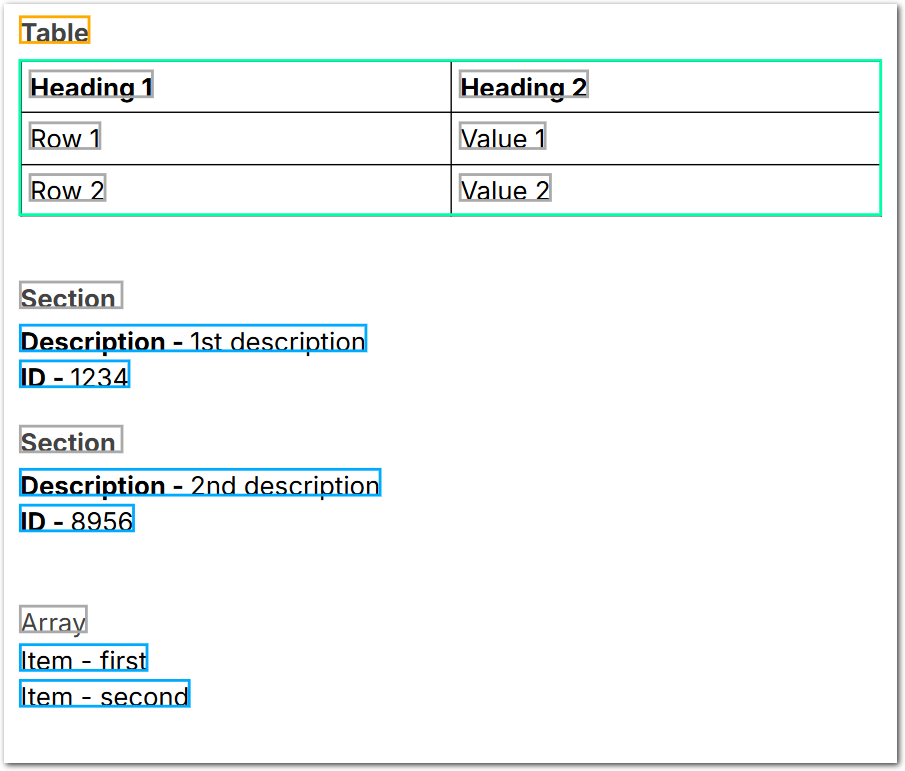
| Example document | [Download link](https://raw.githubusercontent.com/sensible-hq/sensible-docs/v0/assets/pdfs/zip_mixed.pdf) |
| ---------------- | --------------------------------------------------------------------------------------------------------- |
**Output**
```json
{
"table": {
"columns": [
{
"id": "col_1",
"values": [
{
"value": "Heading 1",
"type": "string"
},
{
"value": "Row 1",
"type": "string"
},
{
"value": "Row 2",
"type": "string"
}
]
},
{
"id": "col_2",
"values": [
{
"value": "Heading 2",
"type": "string"
},
{
"value": "Value 1",
"type": "string"
},
{
"value": "Value 2",
"type": "string"
}
]
}
]
},
"sections": [
{
"description": {
"type": "string",
"value": "Description - 1st description"
},
"ID": {
"type": "string",
"value": "ID - 1234"
}
},
{
"description": {
"type": "string",
"value": "Description - 2nd description"
},
"ID": {
"type": "string",
"value": "ID - 8956"
}
}
],
"array": [
{
"type": "string",
"value": "Item - first"
},
{
"type": "string",
"value": "Item - second"
}
],
"zip": [
{
"col_1": {
"value": "Heading 1",
"type": "string"
},
"col_2": {
"value": "Heading 2",
"type": "string"
},
"description": {
"type": "string",
"value": "Description - 1st description"
},
"ID": {
"type": "string",
"value": "ID - 1234"
},
"array": {
"type": "string",
"value": "Item - first"
}
},
{
"col_1": {
"value": "Row 1",
"type": "string"
},
"col_2": {
"value": "Value 1",
"type": "string"
},
"description": {
"type": "string",
"value": "Description - 2nd description"
},
"ID": {
"type": "string",
"value": "ID - 8956"
},
"array": {
"type": "string",
"value": "Item - second"
}
},
{
"col_1": {
"value": "Row 2",
"type": "string"
},
"col_2": {
"value": "Value 2",
"type": "string"
}
}
]
}
```
# Notes
* If a single source field ID outputs an array of tables, then for backward compatibility Sensible discards all other source fields, and returns an array of sections groups, each containing a zipped table. For example, if you configure `"source_ids": ["table_1", "table_2", "table_array", "section_1"]`, where `"table_array"` is configured with `"match":"all"` , then Sensible discards all source fields except `"table_array"`.
* If there are duplicate field keys when merging, the last-listed key in the `source_fields` array overwrites any preceding ones. The following is an example of source fields with simplified syntax:
```json
"item_color": [ {"color": "blue", "ID": 123}, {"color": "red", "ID": 456}, ... ],
"item_size": [ {"size": "x-large", "ID": 789}, {"size": "small", "ID": 456}, ... ]
```
If you zip with `"source_ids": ["item_color", "item_size"]`, then the first merged item is `[ {color: "blue", "ID": 789, "size": "x-large"}, ... ]`.
If you zip with `"source_ids": ["item_size", "item_color"]`, then the first merged item is `[ {"color": "blue", "ID": 123, "size": "x-large"}, ... ]`.