

October 2026
In the last month, Sensible added a validator for testing fingerprints across multiple reference documents at once. Sensible also added a JsonLogic operator for detecting arrays, and new visual troubleshooting options.
New feature: Validate fingerprints across reference documents
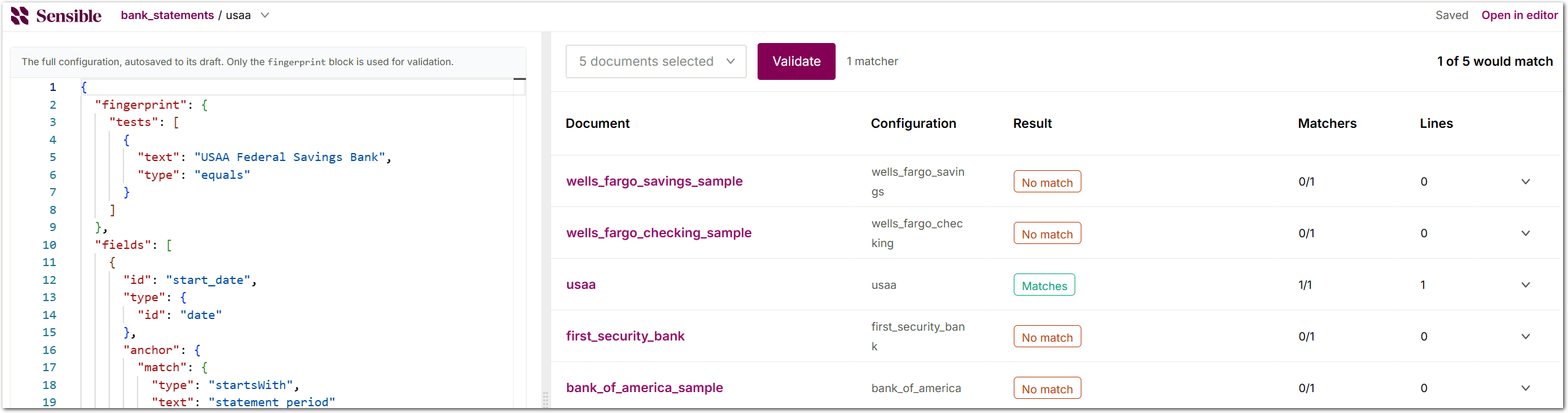
In the SenseML editor, you can now test a config's fingerprint against multiple reference documents at once. Click Options in the middle pane, select Validate fingerprints, and Sensible launches a viewer for fingerprints and reference documents. Select reference documents, and click Validate. For each document, Sensible reports whether the fingerprint matches, partially matches, or doesn't match. You can expand each result to see which matches found text, how many lines they matched, and on which page. To check for false positives, select reference documents that belong to other configs. The validator tests fingerprints the way Sensible runs them for standalone documents, so it ignores the Page parameter in portfolio fingerprints. For more information, see Fingerprint.
Improvement: Exclude the anchor from Region output
The Region method by default outputs all lines in a region, including the anchor line if the region contains it. You can now configure it to exclude the anchor line using the new Include Anchor parameter. For example, use this parameter when you make a region large enough to reliably capture your target data, and the region also captures the anchor line.
New feature: Advanced JsonLogic Is Array operation
In addition to the existing JsonLogic operators for transforming extracted data, Sensible released the new Is Array operator. The operator returns true for arrays, including empty arrays, and false for other values, such as null, objects, strings, and numbers. Use Is Array when you transform output that mixes array fields and single-value fields. For example, combine it with the If and Map Object operators to transform each element of an array field one way, and a single-value field another way. For more information, see Is Array.
Improvement: Stop parameter for the Column method
With the Column method's new Stop parameter, you can specify a line at which to stop extracting, rather than extracting to the end of the page. For example, use this parameter to exclude a note below a table from a column's output.
UX improvement: Show section anchors
To troubleshoot sections, you can now highlight the line each section anchors on in the SenseML editor. Click the Options dropdown and select Show section anchors, and Sensible displays each anchor line in a violet box. Use this option when parameters such as Offset Y shift each section's start away from its anchor line. For more information, see Show section anchors.