

Column
Learn how the Column method extracts lines above or below an anchor line based on x extent alignment or 50% overlap, with parameters and examples.
Extracts all lines below or above the anchor line on the current page if:
-
The anchor line's left and right boundaries ("x extent") contain the target lines' x extent, or vice versa.
Or:
-
The anchor line and target lines overlap by at least 50% of the narrower line's x extent.
When you extract a value from a single-column form, you usually want to stop at the bottom boundary of the column rather than extract to the end of the page. To set where the column ends, you specify the Stop parameter.
Parameters
Note: For additional parameters available for this method, see Global parameters for methods. The following table shows parameters most relevant to or specific to this method.
| key | value | description |
|---|---|---|
| id (required) | column | |
| tiebreaker | tiebreaker | For information about this global parameter, see Method. |
| includeAnchor | true, false. default: false | Includes the anchor line in the method output |
| position | below, above. default: below | Matches above or below the anchor line. For example, if you anchor on the bottom line of a column, set this to above to extract the column. |
| stop | limited support for Match object (doesn't support Match arrays or strings as values). default: none | Stops extraction at the top boundary of the first line that matches. The matched line isn't included in the method output. If you don't specify this parameter, extracts to the end of the page. If you set the Position parameter to above, stops extraction at the bottom boundary of the matched line.The matched line doesn't need to align with the anchor line, so a matching line in a neighboring column also stops extraction. |
Examples
The following example shows that:
- By default, Sensible returns the entire column as a joined string.
- Specifying a tiebreaker returns single element in the column.
- Specifying a Stop parameter excludes the note below the table from the column.
Config
/* Sensible uses JSON5 to support in-line comments*/
{
  "fields": [
    {
      "id": "example_column", /* user-friendly ID for extracted target data */
      "anchor": "may 2020", /* an anchor is text that always occurs in the same position relative to your target data. Without an anchor, Sensible wouldn't know which page to search in for your target data. */
      "type": "string", /* Sensible formats extracted data as this data type, or returns null if it doesn't recognize extracted data as the specified type */
      "method": {
        "id": "column", /* extract lines below the anchor that align with it */
        "stop": { /* stop before the note below the table, e.g., 'For up-to-date rankings, see the current TIOBE index.' */
          "type": "startsWith", /* line must start with the match */
          "text": "for up" /* string to match */
        }
      }
    },
    {
      "id": "example_column_2", /* user-friendly ID for extracted target data */
      "anchor": "may 2020", /* an anchor is text that always occurs in the same position relative to your target data. Without an anchor, Sensible wouldn't know which page to search in for your target data. */
      "type": "number", /* Sensible formats extracted data as this data type, or returns null if it doesn't recognize extracted data as the specified type */
      "method": {
        "id": "column", /* extract lines below the anchor that align with it */
        "tiebreaker": ">" /* return the largest number in the column, e.g., '5' */
      }
    }
  ]
}
Example document
The following image shows the example document used with this example config:
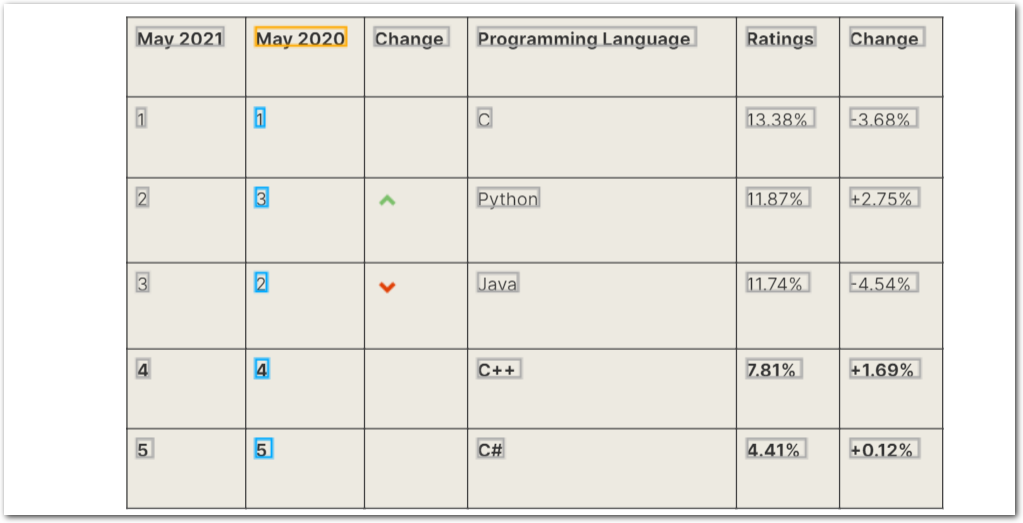
| Example document | Download link |
|---|
Output
{
  "example_column": {
    "type": "string",
    "value": "1 3 2 4 5"
  },
  "example_column_2": {
    "source": "5",
    "value": 5,
    "type": "number"
  }
}
Updated 17 days ago