

Spreadsheet extraction
Learn how to use the Cell Rows field type to extract data from large spreadsheets with thousands of rows by specifying column headers and row ranges.
For large spreadsheets with tens of thousands of rows, the Cell Rows field type extracts cells under specified column headings. This method has the following limitations:
- The spreadsheet must have a simple columnar layout, where the first row or rows contains your target column headers. This method extracts cells in each specified column until the end of the sheet.
- This method extracts solely from the first tab in multi-tab spreadsheets.
- You must upload the spreadsheet to Sensible as one of the supported spreadsheet file types. This method doesn't support PDFs.
The Cell Rows field type is a speedier alternative to general-purpose SenseML methods, which you can use with smaller spreadsheets.
Parameters
| key | value | description |
|---|---|---|
| id (required) | string | Specifies an ID for a group of rows to extract in the spreadsheet. Sensible ignores empty rows and extracts data under the specified Header Row to the end of the worksheet. |
| type (required) | cellRows | |
| headerRow (required) | Anchor object | Specifies the row containing column headers, by matching the specified line or lines in the row. Sensible ignores empty cells in the header row. Contains the following parameters: - match: A Match object or array of Match objects. |
| headerRowsCount | integer. default: 1 | Specifies the number of consecutive header rows. You can specify a match in the Field object's Header parameter for any header row. |
| stop | Match object or array of Match objects. default: none | Stops extraction at the end of the row above the matched line. Excludes the row containing the matched line. |
| fields | array of fields that use any of the following methods: - the cell methodcomputed field-methods - custom computation group method | Specifies fields that use one or more of the following methods, all of which operate on each row: - cell: A spreadsheet-specific method that extracts a cell under the specified header for each extracted row. Parameters:id: cell. Note: The method object's global parameters aren't available for this method.header: A Match object that specifies the column heading under which you want to extract cells. For an example, see the following section.- Computed field methods: Fields that use computed field methods, such as the Split, Suppress Output, or Custom Computation methods, operate on the already-extracted cell values for each row. Each field adds a computed field to each row's output. - Custom Computation Group method: Fields that use the Custom Computation Group method operate on the already-extracted cell values for each row. Because each field can add multiple computed fields to each row's output, this method offers more concise syntax and faster performance than the Custom Computation method. |
Example
The following example extracts bestselling book data from a spreadsheet. It uses the Custom Computation Group method to convert the raw sales figures (stored in millions in the column header) to actual copy counts and to flag books with over 50 million copies sold.
Config
{
  "fields": [
    {
      "id": "bestselling_books",
      "type": "cellRows",
      /* specify the column headings row: contains the lines 'author(s)' and 'genre */
      "headerRow": {
        "match": [
          {
            "type": "startsWith",
            "text": "author"
          },
          {
            "type": "includes",
            "text": "genre"
          }
        ]
      },
      "fields": [
        {
          "id": "book_title",
          "method": {
            "id": "cell",
            /* extract all the cells under the column header that starts with
               the text `book` until the end of the sheet (skips empty rows)  */
            "header": {
              "type": "startsWith",
              "text": "book"
            }
          }
        },
        {
          "id": "first_published",
          "method": {
            "id": "cell",
            /* extract the cells under the header containing `published` */
            "header": {
              "type": "includes",
              "text": "published"
            }
          }
        },
        {
          /* get the raw sales data */
          "id": "_sales_raw",
          "method": {
            "id": "cell",
            /* extract the cells under the header that starts with
               the text `approximate`  */
            "header": {
              "type": "startsWith",
              "text": "approximate"
            }
          }
        },
        {
          /* get the raw language data*/
          "id": "_language_raw",
          "method": {
            "id": "cell",
            /* extract the cells under the header that includes
               the text `language`  */
            "header": {
              "type": "includes",
              "text": "language"
            }
          }
        },
        /* map the raw language data to country codes */
        {
          "id": "language",
          "method": {
            "id": "mapper",
            "source_id": "_language_raw",
            "mappings": {
              "English": "en",
              "French": "fr",
              "German": "de"
            },
            "default": "mapping doesn't exist"
          }
        },
        {

          "method": {
            "id": "customComputationGroup",
            "jsonLogic": {
              "eachKey": {
                /* the column header says 'Approximate sales in millions', so multiply by 1,000,000 to get the actual sales count.  */
                "sales_copies": {
                  "*": [{ "var": "_sales_raw.value" }, 1000000]
                },
                /*  flag highest-selling titles */
                "over_50_million": { ">": [{ "var": "_sales_raw.value" }, 50] }
              }
            }
          }
        },
        {
          /* for cleaner output, hide the raw data */
          "id": "hide_fields",
          "method": {
            "id": "suppressOutput",
            "source_ids": ["_language_raw", "_sales_raw"]
          }
        }
      ]
    }
  ]
}
Example document
The following image shows the example document used with this example config:
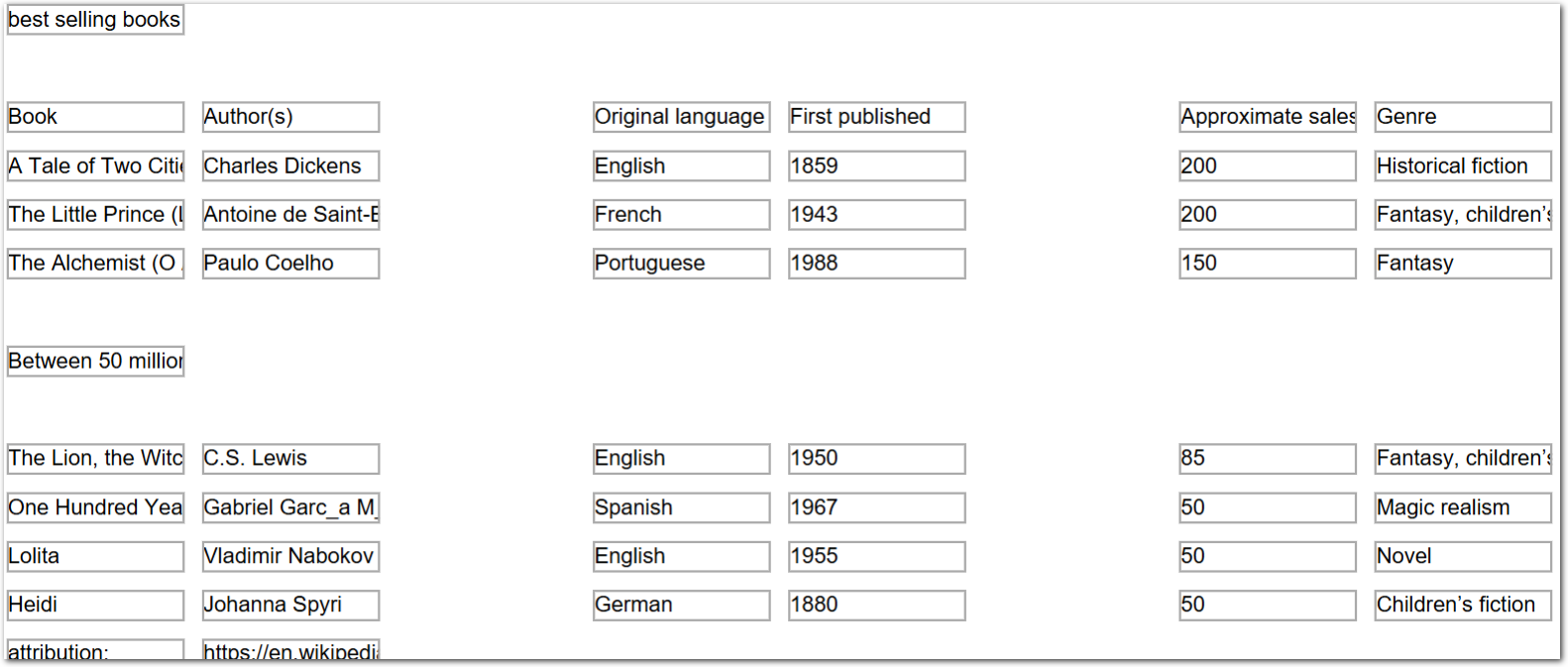
| Example document | Download link |
|---|
Output
{
  "bestselling_books": [
    {
      "book_title": {
        "value": "A Tale of Two Cities",
        "type": "string"
      },
      "first_published": {
        "value": "1859",
        "type": "string"
      },
      "language": {
        "value": "en",
        "type": "string"
      },
      "sales_copies": {
        "value": 200000000,
        "type": "number"
      },
      "over_50_million": {
        "value": true,
        "type": "boolean"
      }
    },
    {
      "book_title": {
        "value": "The Little Prince (Le Petit Prince)",
        "type": "string"
      },
      "first_published": {
        "value": "1943",
        "type": "string"
      },
      "language": {
        "value": "fr",
        "type": "string"
      },
      "sales_copies": {
        "value": 200000000,
        "type": "number"
      },
      "over_50_million": {
        "value": true,
        "type": "boolean"
      }
    },
    {
      "book_title": {
        "value": "The Alchemist (O Alquimista)",
        "type": "string"
      },
      "first_published": {
        "value": "1988",
        "type": "string"
      },
      "language": {
        "value": "mapping doesn't exist",
        "type": "string"
      },
      "sales_copies": {
        "value": 150000000,
        "type": "number"
      },
      "over_50_million": {
        "value": true,
        "type": "boolean"
      }
    },
    {
      "book_title": {
        "value": "Between 50 million and 100 million copies",
        "type": "string"
      },
      "first_published": null,
      "language": null,
      "sales_copies": {
        "value": 0,
        "type": "number"
      },
      "over_50_million": {
        "value": false,
        "type": "boolean"
      }
    },
    {
      "book_title": {
        "value": "The Lion, the Witch and the Wardrobe",
        "type": "string"
      },
      "first_published": {
        "value": "1950",
        "type": "string"
      },
      "language": {
        "value": "en",
        "type": "string"
      },
      "sales_copies": {
        "value": 85000000,
        "type": "number"
      },
      "over_50_million": {
        "value": true,
        "type": "boolean"
      }
    },
    {
      "book_title": {
        "value": "One Hundred Years of Solitude (Cien años de soledad)",
        "type": "string"
      },
      "first_published": {
        "value": "1967",
        "type": "string"
      },
      "language": {
        "value": "mapping doesn't exist",
        "type": "string"
      },
      "sales_copies": {
        "value": 50000000,
        "type": "number"
      },
      "over_50_million": {
        "value": false,
        "type": "boolean"
      }
    },
    {
      "book_title": {
        "value": "Lolita",
        "type": "string"
      },
      "first_published": {
        "value": "1955",
        "type": "string"
      },
      "language": {
        "value": "en",
        "type": "string"
      },
      "sales_copies": {
        "value": 50000000,
        "type": "number"
      },
      "over_50_million": {
        "value": false,
        "type": "boolean"
      }
    },
    {
      "book_title": {
        "value": "Heidi",
        "type": "string"
      },
      "first_published": {
        "value": "1880",
        "type": "string"
      },
      "language": {
        "value": "de",
        "type": "string"
      },
      "sales_copies": {
        "value": 50000000,
        "type": "number"
      },
      "over_50_million": {
        "value": false,
        "type": "boolean"
      }
    },
    {
      "book_title": {
        "value": "attribution:",
        "type": "string"
      },
      "first_published": null,
      "language": null,
      "sales_copies": {
        "value": 0,
        "type": "number"
      },
      "over_50_million": {
        "value": false,
        "type": "boolean"
      }
    }
  ]
}
Updated about 1 month ago