

Split lines
Use the Split Lines preprocessor to split horizontally distributed lines in typewriter-style documents using whitespace or custom separator characters.
Splits lines distributed along a horizontal axis. This preprocessor is most useful for typewriter-style documents that use whitespaces for formatting.
Parameters
Note: For additional parameters available for this method, see Global parameters for methods. The following table shows parameters most relevant to or specific to this method.
| key | value | description |
|---|---|---|
| type (required) | splitLines | splits lines distributed along a horizontal axis. |
| minSpaces (required) | number | The number of consecutive whitespace characters at or above which to split lines. |
| separator | string | Modifies the Min Spaces parameter to split on the specified character, for example "-", instead of the default whitespace character. For example, if you specify "-" for this parameter and 2 for the Min Spaces parameter, then Sensible splits lines when it finds --. |
| match or range | A Match object or array of Match objects or Range object | Specifies the matching pages or repeating document ranges ("sections") in which to run this preprocessor.match: Sensible runs this preprocessor on each page containing the matched text.range: Sensible runs this preprocessor in the specified repeating document ranges, leaving lines outside the range unchanged. For information about this option's parameters, see the Range parameters for horizontal sections. For an example, see Example 2. |
Limitations
When you configure the Split Lines preprocessor, the Sensible app's line rendering is approximate and can be inaccurate. To accurately view a line's raw text, select the line.
Examples
Example 1
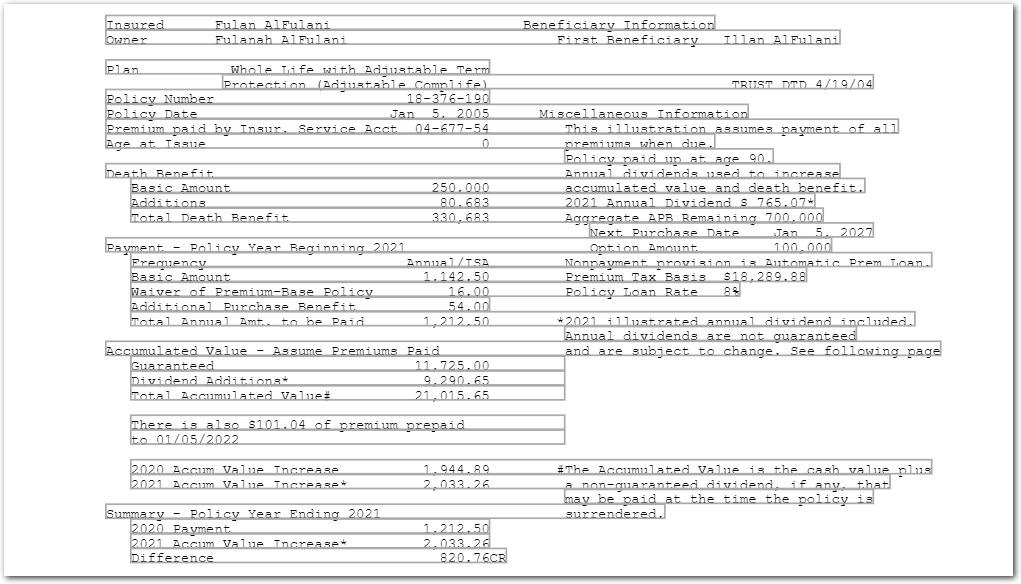
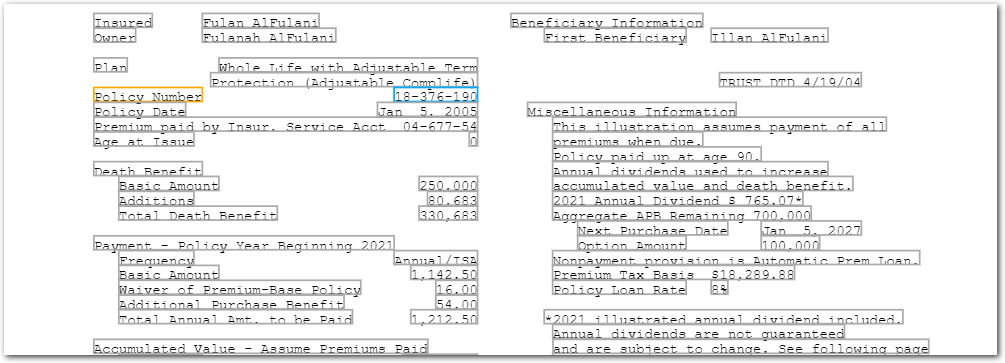
The following example shows solving undersplit lines in a "typewritten" style document. The Split Lines preprocessor preserves columns and rows in this document.
PROBLEM
Without the Split Lines preprocessor, Sensible merges the lines too aggressively:
SOLUTION
Config
{
  "preprocessors": [
    {
      "type": "splitLines",
      "minSpaces": 3
    }
  ],
  "fields": [
    {
      "id": "policy_number",
      "method": {
        "id": "row",
      },
      "anchor": "policy number",
    }
  ]
}
Example document
The following image shows the example document used with this example config:
| Example document | Download link |
|---|
Output
{
  "policy_number": {
    "type": "string",
    "value": "18-376-190"
  }
}
Example 2
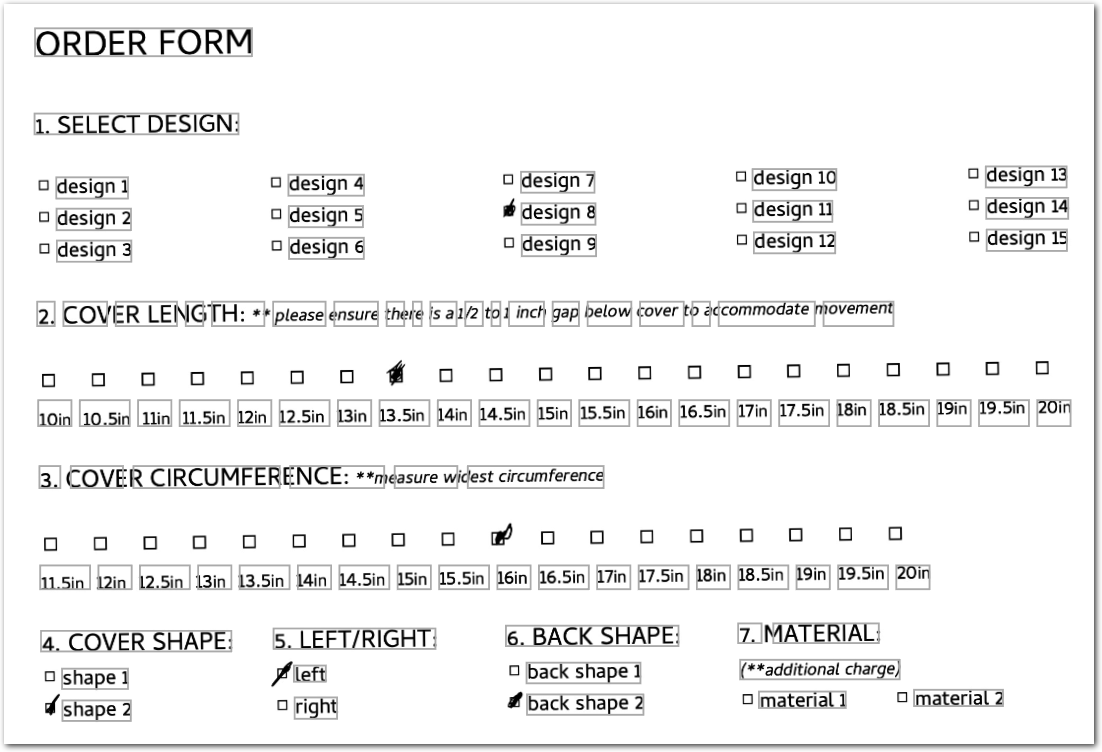
The following example shows using the Range parameter to split lines in specified sections of a typewritten, scanned musical instrument cover order forms. This configuration enables you to extract repeating data from multiple order forms.
PROBLEM
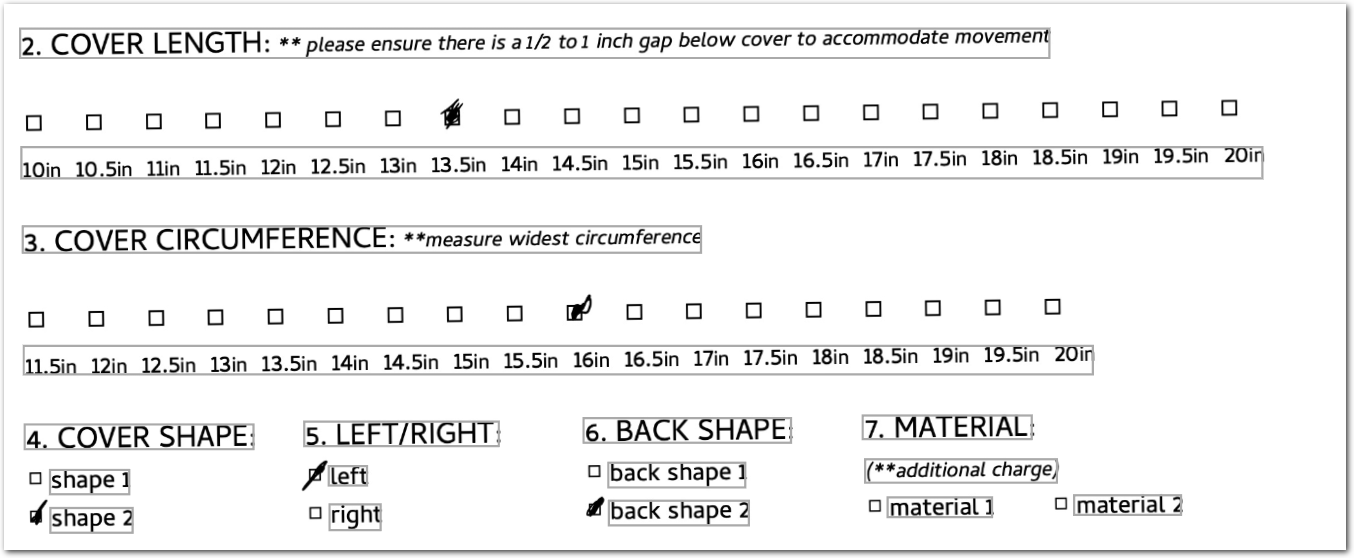
Without the Split Lines preprocessor, the OCR preprocessor merges the lines too aggressively, so that the Nearest Checkbox method can't recognize which checkbox belongs to which label in the Length and Circumference sections of the document:
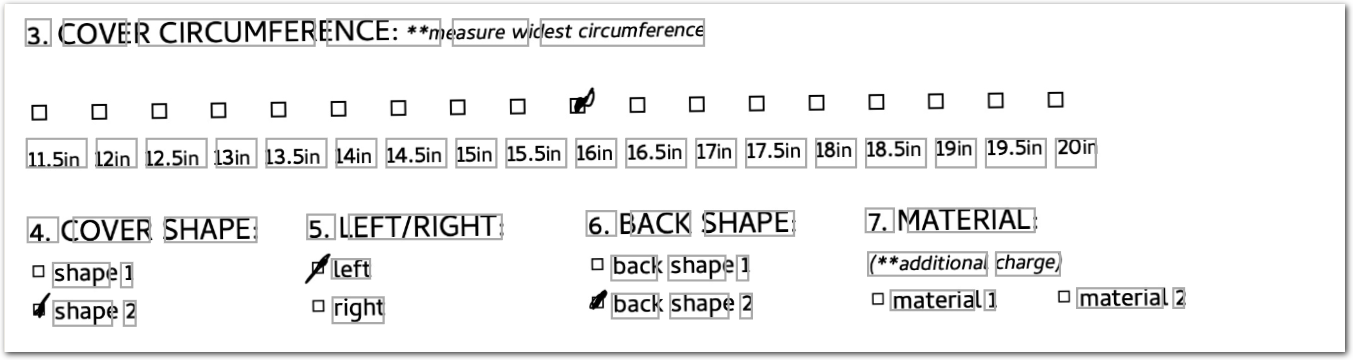
However, if you apply Split Lines preprocessor to the entire document, Sensible over-splits words into letters in other sections:
SOLUTION
Two Split Line preprocessors use the Range parameter to specify only the Length and Circumference sections, splitting the overmerged sections and leaving the rest of the document unaffected.
Config
    /*  Ensure the document type's OCR Engine parameter is set to Amazon for this example */
{
  "preprocessors": [

    /* in the COVER LENGTH and COVER CIRCUMFERENCE sections,
       use the Split Lines preprocessor to correct the OCR engine's default behavior of
       merging length labels (10 in, 10.5 in, etc) into one line, causing
       the Nearest Checkbox method to fail.
       However, if you apply the Split Lines preprocessor to the entire document,
       Sensible oversplits other sections. Avoid this by targeting only the overmerged
       sections using the Range parameter
       (to observe oversplitting, sub "match": ""
       for the "range" param in each Split Lines preprocessor */

    {
      /* split lines in the COVER LENGTH section,
         starting before COVER LENGTH and ending after COVER CIRCUMFERENCE */
      "type": "splitLines",
      /* the number of consecutive whitespace characters at or above which to split lines;
         use a low number to split closely spaced lines */
      "minSpaces": 1,
      "range": {
        /* scope of the preprocessor: Sensible splits lines only within each document range */
        "anchor": {
          /* required. Sensible starts each range before each match */
          "match": {
            /* text marking the start of the range */
            "type": "includes",
            "text": "cover length"
          }
        },
        "stop": {
          /* optional. text marking the end of each range */
          "type": "includes",
          "text": "cover circumference"
        }
      }
    },

    {
      /* split lines in the COVER CIRCUMFERENCE section,
         starting before COVER CIRCUMFERENCE and ending after COVER SHAPE */
      "type": "splitLines",
      "minSpaces": 1,
      "range": {
        "anchor": {
          "match": {
            "type": "includes",
            "text": "cover circumference"
          }
        },
        "stop": {
          "type": "includes",
          "text": "cover shape"
        }
      }
    }
  ],
  "fields": [
    {
      /* extract the selected checkbox value for cover length */
      "id": "_length_sections" /* ID for the extracted array of sections */,
      "type": "sections" /* extracts repeating document ranges; returns each range as an object in an array */,
      "range": {
        "anchor": {
          /* required. defines which lines start each section */
          "match": {
            /* required. repeated text marking the start of each section */
            "text": "length",
            "type": "includes"
          }
        },
        "stop": {
          /* optional. text marking each section's bottom boundary; if omitted, each section ends where the next starts */
          "text": "circumference",
          "type": "includes"
        },
        "stopOffsetY": -0.1 /* shifts each section's bottom boundary 0.1 inches up from the stop line */
      },
      /* fields to extract from each section */
      "fields": [
        /* abbreviated; in production, start at 10 inches */
        /* each 'inch' field returns true/false to represent checkbox's selection status */
        {
          "id": "13in",
          "anchor": {
            "match": {
              "text": "13in",
              "type": "equals"
            }
          },
          "method": {
            "id": "nearestCheckbox",
            "position": "left",
            "offsetY": -0.25
          }
        },
        {
          "id": "13.5in",
          "anchor": {
            "match": {
              "text": "13.5in",
              "type": "equals"
            }
          },
          "method": {
            "id": "nearestCheckbox",
            "position": "left",
            "offsetY": -0.25
          }
        },
        {
          "id": "14in",
          "anchor": {
            "match": {
              "text": "14in",
              "type": "equals"
            }
          },
          "method": {
            "id": "nearestCheckbox",
            "position": "left",
            "offsetY": -0.25
          }
        },
        {
          "id": "14.5in",
          "anchor": {
            "match": {
              "text": "14.5in",
              "type": "equals"
            }
          },
          "method": {
            "id": "nearestCheckbox",
            "position": "left",
            "offsetY": -0.25
          }
        },
        {
          "id": "15in",
          "anchor": {
            "match": {
              "text": "15in",
              "type": "equals"
            }
          },
          "method": {
            "id": "nearestCheckbox",
            "position": "left",
            "offsetY": -0.25
          }
        },
        {
          "id": "15.5in",
          "anchor": {
            "match": {
              "text": "15.5in",
              "type": "equals"
            }
          },
          "method": {
            "id": "nearestCheckbox",
            "position": "left",
            "offsetY": -0.25
          }
        },
       /* output only the cover length whose value is true (representing a selected checkbox) */
        {
          "id": "COVER_LENGTH",
          "method": {
            "id": "pickValues",
            "source_ids": [
              "13in",
              "13.5in",
              "14in",
              "14.5in",
              "15in",
              "15.5in"
            ],
            "match": "one"
          }
        },
        /* clean up output: remove allthe source "inch" boolean values, which are input for the Pick Values method */
        {
          "id": "clean",
          "method": {
            "id": "suppressOutput",
            "source_ids": {
              "pattern": "^.*in$"
            }
          }
        }
      ]
    },
    {
      /* extract the selected checkbox value for cover circumference */
      "id": "_circumference_sections" /* ID for the extracted array of sections */,
      "type": "sections" /* extracts repeating document ranges; returns each range as an object in an array */,
      "range": {
        "anchor": {
          /* required. defines which lines start each section */
          "match": {
            /* required. repeated text marking the start of each section */
            "text": "circumference",
            "type": "includes"
          }
        },
        "stop": {
          /* optional. text marking each section's bottom boundary; if omitted, each section ends where the next starts */
          "text": "cover shape",
          "type": "includes"
        },
        "stopOffsetY": -0.2 /* shifts each section's bottom boundary 0.2 inches up from the stop line */
      },
      "fields": [
        /* fields to extract from each section */
        /* abbreviated; in production, start at 11.5 inches */
        {
          "id": "15.5in",
          "anchor": {
            "match": {
              "text": "15.5in",
              "type": "equals"
            }
          },
          "method": {
            "id": "nearestCheckbox",
            "position": "left",
            "offsetY": -0.25
          }
        },
        {
          "id": "16in",
          "anchor": {
            "match": {
              "text": "16in",
              "type": "equals"
            }
          },
          "method": {
            "id": "nearestCheckbox",
            "position": "left",
            "offsetY": -0.25
          }
        },
        {
          "id": "16.5in",
          "anchor": {
            "match": {
              "text": "16.5in",
              "type": "equals"
            }
          },
          "method": {
            "id": "nearestCheckbox",
            "position": "left",
            "offsetY": -0.25
          }
        },
        {
          "id": "17in",
          "anchor": {
            "match": {
              "text": "17in",
              "type": "equals"
            }
          },
          "method": {
            "id": "nearestCheckbox",
            "position": "left",
            "offsetY": -0.25
          }
        },
        {
          "id": "17.5in",
          "anchor": {
            "match": {
              "text": "17.5in",
              "type": "equals"
            }
          },
          "method": {
            "id": "nearestCheckbox",
            "position": "left",
            "offsetY": -0.25
          }
        },
        /* abbreviated; in production, continue up to 20in */
        {
          "id": "COVER_CIRCUMFERENCE",
          "method": {
            "id": "pickValues",
            "source_ids": [
              /* abbreviated; in production, start at 11.5 inches and end at 20in */
              "15.5in",
              "16in",
              "16.5in",
              "17in",
              "17.5in"
            ],
            "match": "one"
          }
        },
        {
          "id": "clean",
          "method": {
            "id": "suppressOutput",
            "source_ids": {
              "pattern": "^.*in$"
            }
          }
        }
      ]
    },
    {
      /* extract the selected checkbox value for LEFT/RIGHT side */
      "id": "_side_sections" /* ID for the extracted array of sections */,
      "type": "sections" /* extracts repeating document ranges; returns each range as an object in an array */,
      "range": {
        "anchor": {
          /* required. defines which lines start each section */
          "match": {
            /* required. repeated text marking the start of each section */
            "text": "cover shape",
            "type": "includes"
          }
        },
        "stop": {
          /* optional. text marking each section's bottom boundary; if omitted, each section ends where the next starts */
          "text": "main color",
          "type": "includes"
        },
        "stopOffsetY": -0.2 /* shifts each section's bottom boundary 0.2 inches up from the stop line */
      },
      "fields": [
        /* fields to extract from each section */
        {
          "id": "left_side",
          "method": {
            "id": "nearestCheckbox",
            "position": "left"
          },
          "anchor": {
            "match": {
              "text": "left",
              "type": "equals"
            }
          }
        },
        {
          "id": "right_side",
          "method": {
            "id": "nearestCheckbox",
            "position": "left"
          },
          "anchor": {
            "match": {
              "text": "right",
              "type": "equals"
            }
          }
        },
        {
          "id": "LEFT_RIGHT",
          "method": {
            "id": "pickValues",
            "source_ids": ["left_side", "right_side"],
            "match": "one"
          }
        },
        /* clean up output: remove all "_side" boolean values and only
           output the selected checkbox */
        {
          "id": "clean",
          "method": {
            "id": "suppressOutput",
            "source_ids": {
              "pattern": "^.*_side$"
            }
          }
        }
      ]
    },
    /* zip the sections so each order form's data is grouped together */
    {
      "id": "order_selections",
      "method": {
        "id": "zip",
        "source_ids": [
          "_length_sections",
          "_circumference_sections",
          "_side_sections"
        ]
      }
    },
    /* clean the output:
       remove the source sections fields and only output the zipped sections */
    {
      "id": "clean",
      "method": {
        "id": "suppressOutput",
        "source_ids": {
          "pattern": "^_.*$"
        }
      }
    }
  ]
}
Example document
The following image shows the example document used with this example config:
page 1:
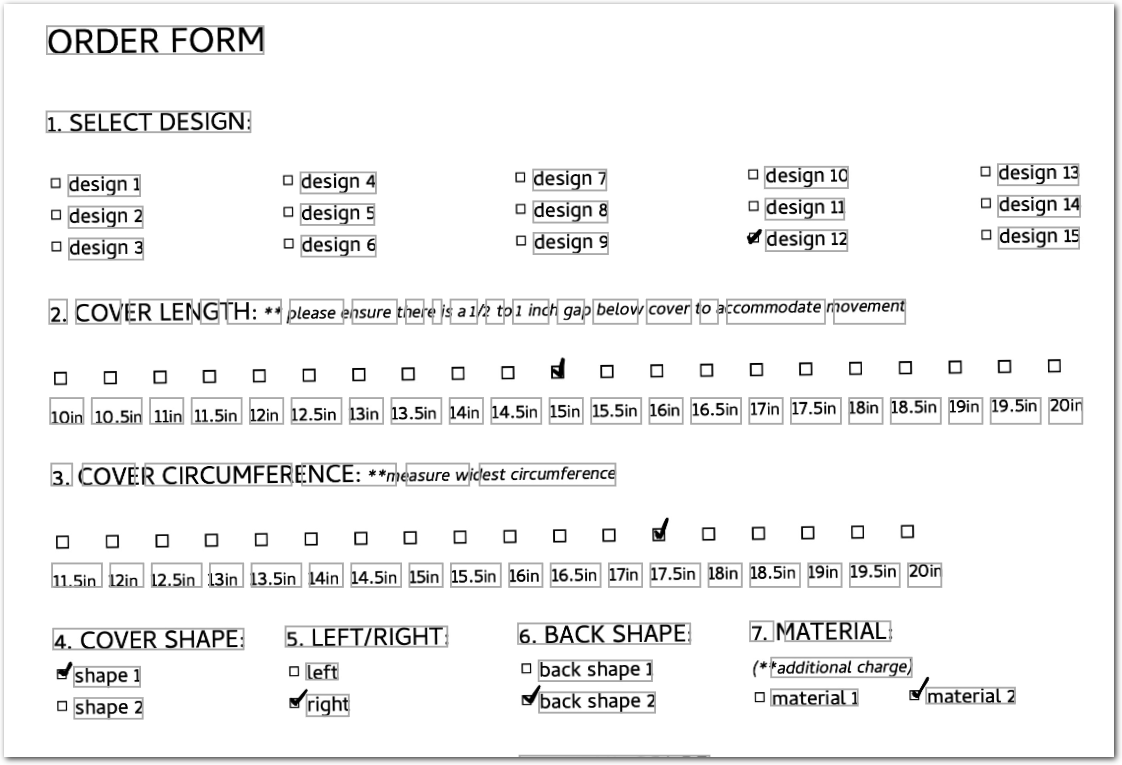
page 2:
| Example document | Download link |
|---|
Output
{
  "order_selections": [
    {
      "COVER_LENGTH": {
        "value": "15in",
        "type": "string"
      },
      "COVER_CIRCUMFERENCE": {
        "value": "17.5in",
        "type": "string"
      },
      "LEFT_RIGHT": {
        "value": "right_side",
        "type": "string"
      }
    },
    {
      "COVER_LENGTH": {
        "value": "13.5in",
        "type": "string"
      },
      "COVER_CIRCUMFERENCE": {
        "value": "16in",
        "type": "string"
      },
      "LEFT_RIGHT": {
        "value": "left_side",
        "type": "string"
      }
    }
  ]
}
Updated 8 days ago