

Remove page
Delete PDF pages matching specified text, with parameters and examples for targeted page removal.
Removes pages that match the specified text.
Parameters
| key | value | description |
|---|---|---|
| type (required) | removePage | |
| match (required) | Match object | Sensible removes the page that contain this text. |
| matchAll | boolean | If true, removes all pages containing the text specified by the Match parameter. |
| pageOffset | number. default: 0 | The zero-indexed number of the page to remove, counting from the page number of the text matched by the Match parameter. To remove a single page offset from the first page of the document, rather than offset from matched text, specify "match": { "type": "first" }. |
Examples
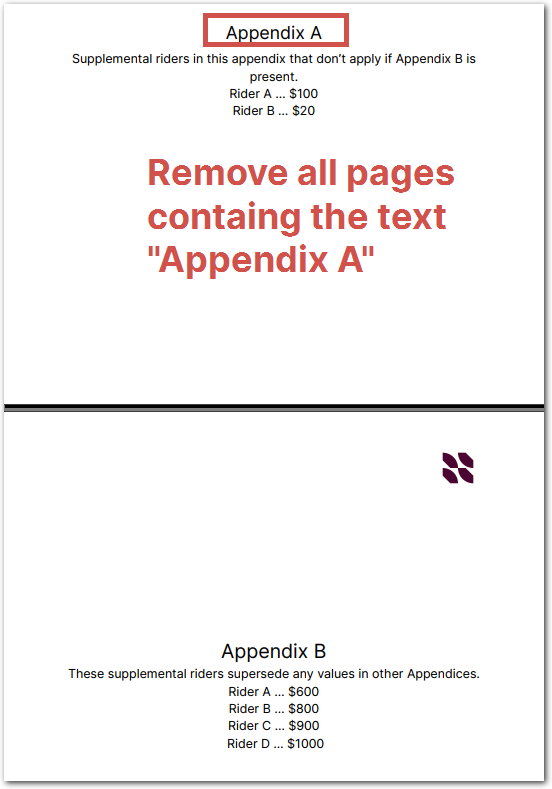
The following example shows removing all pages with an Appendix A header in order to extract text from Appendix B pages.
Config
{
  "preprocessors": [
    {
      /* remove all pages containing
         the large-font header "Appendix A" */
      "type": "removePage",
      "match": {
        "type":"equals",
        "text": "Appendix A",
        "minimumHeight": 0.2
      },
      "matchAll": true
    }
  ],
  "fields": [
    /* get the Rider A in appendix B,
       not in Appendix A */
    {
      "id": "rider_A",
      "anchor": "rider a",
      "type": "currency",
      "method": {
        "id": "label",
        "position": "right",
      }
    }
  ]
}
Example document
| Example document | Download link |
|---|
Output
{
  "rider_A": {
    "source": "$600",
    "value": 600,
    "unit": "$",
    "type": "currency"
  }
}
Updated 2 days ago
Did this page help you?