

Extra data
Inject request-time data into extraction configs to validate, transform, and cross-check extracted fields across documents.
Use this method to inject data you supply at request time into the extraction config, so you can dynamically validate, transform, and postprocess extracted document data. You supply the data in a extra_data object as part of an asynchronous extraction request. You can customize each extra_data object for each document for which you request extraction.
Common use cases include:
- Chain extractions for cross-document validation: Extract fields from a first document (for example, name and date of birth from a loan application), then pass them as
extra_datainto an extraction request for a second document (for example, the loan applicant's bank statement). The config for the second document compares the extracted values from the first and second documents and outputs Boolean values to indicate if the applicant's name and date of birth are consistent in both documents. - Incorporate external data: After extracting a VIN from an auto insurance document, call a third-party lookup service and pass the result (for example, recorded mileage) back as
extra_datain a follow-up request to the same document. The config compares the lookup value to the extracted value and flags any discrepancy.
flowchart LR
    A["External context (system of record, prior extraction, agent reasoning)"] -->|"extra_data"| C["Sensible async extraction"]
    B["Document"] --> C
    C --> D["Output (extracted fields + validated & transformed fields)"]
For information about supplyingextra_data in an extraction request, see the asynchronous extraction endpoints, for example, the Generate upload URL endpoint.
Parameters
The following parameters are in the computed field's global Method parameter:
| key | value | description |
|---|---|---|
| id (required) | extraData | |
| key (required) | string | Key to look up in the request's extra_data object.If the request omits extra_data, if the object doesn't contain the specified key, or if the specified key's value is null, Sensible returns null. These cases aren't distinguishable in the output.The extra_data object must be flat: strings, numbers, booleans, or null. Nested objects and arrays aren't supported.When you submit a portfolio extraction with extra_data, Sensible passes the same object to every document extracted from the portfolio. For example, if a portfolio contains an auto insurance declarations page and a loan application, both configs can independently look up the same extra_data keys and produce their own computed fields based on them. |
Examples
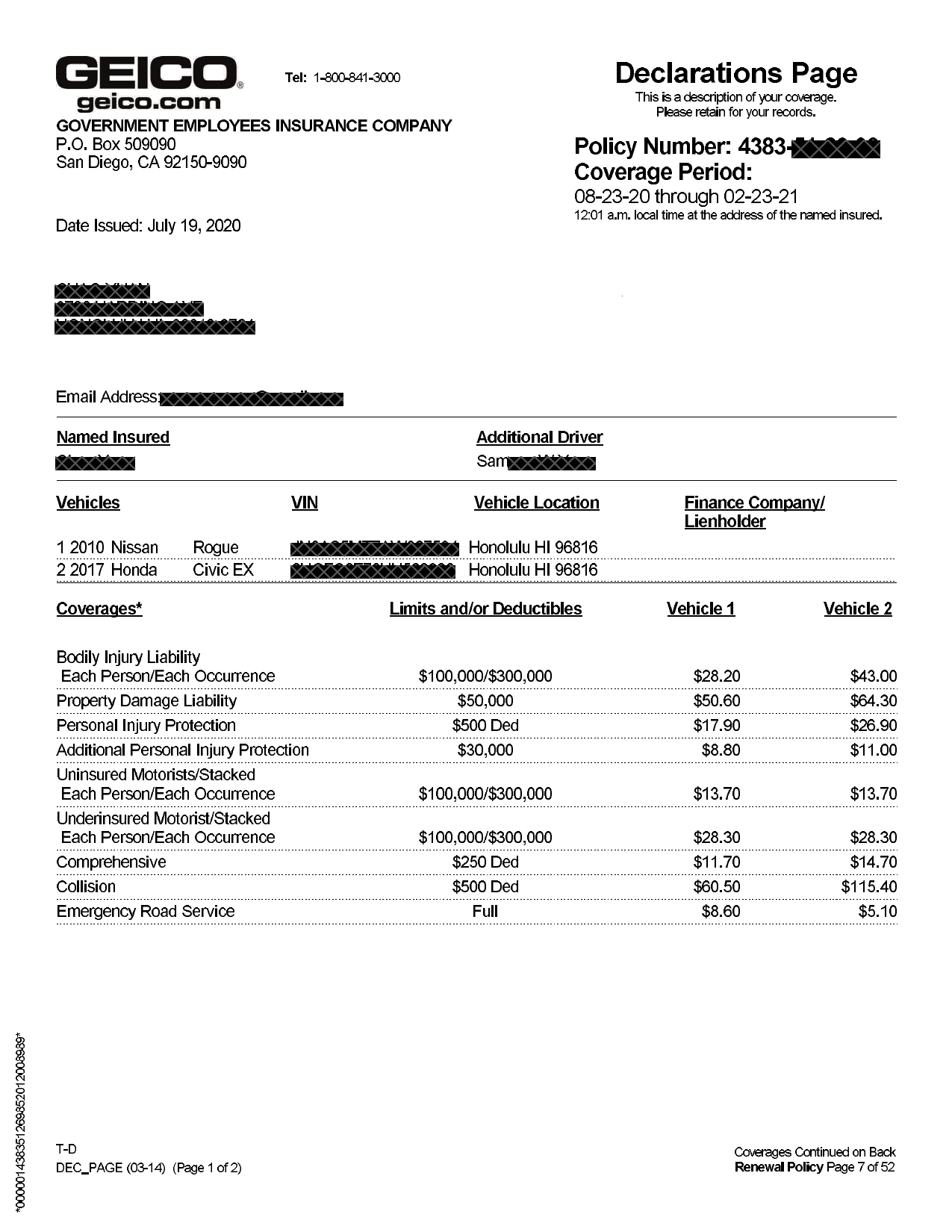
The following example uses the Extra Data method to cross-check values from a policy management system against a GEICO auto insurance declarations page.
Config
{
  "fields": [
    {
      "id": "collision_deductible",
      "type": "currency",
      "anchor": {
        "match": [
          { "text": "Coverages", "type": "startsWith" },
          { "text": "Collision", "type": "startsWith" }
        ]
      },
      "method": {
        "id": "row",
        "position": "right",
        "tiebreaker": "first" /* leftmost value in row = the Limits and/or Deductibles column */
      }
    },
    {
      "id": "comprehensive_deductible",
      "type": "currency",
      "anchor": {
        "match": [
          { "text": "Coverages", "type": "startsWith" },
          { "text": "Comprehensive", "type": "startsWith" }
        ]
      },
      "method": {
        "id": "row",
        "position": "right",
        "tiebreaker": "first" /* leftmost value in row = the Limits and/or Deductibles column */
      }
    },
    {
      "id": "expected_insured_vehicle",
      "method": { "id": "extraData", "key": "expected_insured_vehicle" } /* pulls expected vehicle make, model, and year (NISSAN ROGUE 2010) from the `extra_data` object you provided in the extraction request. precedes the `vehicle_matches` LLM query so that following source_ids can reference it  */
    },
    {
      "method": {
        "id": "queryGroup",
        "queries": [

            "id": "insured_vehicle",
            "description": "year, make, and model of the first vehicle listed on the policy", /* Use an LLM to extract vehicle information from the document */
            "type": "string"
          }
        ]
      }
    },
    {
      "method": {
        "id": "queryGroup",
        "source_ids": [
          "expected_insured_vehicle",
          "insured_vehicle"
        ] /* gives the LLM both values as context for a semantic comparison */,
        "queries": [
          {
            "id": "vehicle_matches",
            "description": "Do these two vehicle descriptions refer to the same vehicle? Ignore differences in capitalization and word order. Answer true or false.", /* expected output is true; vehicle names vary but are semantically the same*/
            "type": "boolean"
          }
        ]
      }
    },
    {
      "id": "expected_collision_deductible" /* pulls the expected value (500) from the `extra_data` object you provided in the extraction request. */,
      "method": { "id": "extraData", "key": "expected_collision_deductible" }
    },
    {
      "id": "expected_comprehensive_deductible" /* pulls the expected value (300) from the `extra_data` object you provided in the extraction request */,
      "method": {
        "id": "extraData",
        "key": "expected_comprehensive_deductible"
      }
    },
    {
      "id": "collision_deductible_matches" /* use deterministic logic to compare document's deductible to expected value. output is true*/,
      "method": {
        "id": "customComputation",
        "jsonLogic": {
          "==": [
            { "var": "collision_deductible.value" },
            { "var": "expected_collision_deductible.value" }
          ]
        }
      }
    },
    {
      "id": "comprehensive_deductible_matches" /* use deterministic logic to compare document's deductible to expected value. output is false */,
      "method": {
        "id": "customComputation",
        "jsonLogic": {
          "==": [
            { "var": "comprehensive_deductible.value" },
            { "var": "expected_comprehensive_deductible.value" }
          ]
        }
      }
    }
  ]
}
Request
To provide the extra data for the preceding config, take the following steps:
- Create a document type in the Sensible app using the following example document.
- Add a config to the document type using the preceding SenseML and publish the config to production.
- Run the following command in a terminal, substituting your document type and your API key:
curl --location 'https://api.sensible.so/v0/extract_from_url/your_doc_type' \
--header 'Content-Type: application/json' \
--header 'Authorization: Bearer YOUR_API_KEY' \
--data '{
  "document_url": "https://raw.githubusercontent.com/sensible-hq/sensible-docs/v0/assets/pdfs/extra_data.pdf",
  "extra_data": {
    "expected_collision_deductible": 500,
    "expected_comprehensive_deductible": 300,
    "expected_insured_vehicle": "NISSAN ROGUE 2010"
  }
}'
Example document
The following image shows the example document used with this example config:
| Example document | Download link |
|---|
Output
{
        "collision_deductible": {
            "source": "$500",
            "value": 500,
            "unit": "$",
            "type": "currency"
        },
        "comprehensive_deductible": {
            "source": "$250",
            "value": 250,
            "unit": "$",
            "type": "currency"
        },
        "expected_insured_vehicle": {
            "value": "NISSAN ROGUE 2010",
            "type": "string"
        },
        "insured_vehicle": {
            "value": "2010 Nissan Rogue",
            "type": "string",
            "confidenceSignal": "confident_answer"
        },
        "vehicle_matches": {
            "value": true,
            "type": "boolean",
            "confidenceSignal": "not_supported"
        },
        "expected_collision_deductible": {
            "value": 500,
            "type": "number"
        },
        "expected_comprehensive_deductible": {
            "value": 300,
            "type": "number"
        },
        "collision_deductible_matches": {
            "value": true,
            "type": "boolean"
        },
        "comprehensive_deductible_matches": {
            "value": false,
            "type": "boolean"
        }
    }
In the preceding output, the vehicle_matches field is true even though "NISSAN ROGUE 2010" (policy system) doesn't equal "2010 Nissan Rogue" (document). The LLM recognizes they refer to the same vehicle. To compare numeric values, you use deterministic logic. The collision_deductible_matches field is true because the deductible ($500) matches the expected value. The comprehensive_deductible_matches field is false because the document shows $250, not the expected $300.
Updated 22 days ago