

JSON postprocessor
Transform extracted data into a custom JSON output schema
Transform extracted data into a custom JSON output schema with a JsonLogic-based postprocessor. For example, use this postprocessor if your app or API consumes data using a pre-existing schema, and you don't want to integrate using Sensible's output schema.
In detail, Sensible's parsed_document API output schema represents extracted document data as typed fields:
{
  "parsed_document": {
    "contract_date": {
      "value": "2023-01-01T00:00:00.000Z",
      "type": "date"
    },
    "customer_name": {
      "type": "string",
      "value": "John Smith"
    }
  }
}
Using a postprocessor, you can transform the extracted data into a custom schema, for example:
{
  "postprocessorOutput": {
    "custom_object": {
      "contract_date": "2023-01-01T00:00:00.000Z",
      "customer_name": "John Smith"
    }
  }
}
The postprocessor offers similar data manipulation to the Custom Computation computed field method, but offers greater flexibility because it can output an arbitrary schema instead of outputting typed fields.
Find postprocessor output in the postprocessorOutput object in the API response and in the Postprocessed tab in the SenseML editor:

Postprocessor output isn't available in Excel output.
Parameters
| key | value | description |
|---|---|---|
| type (required) | jsonLogic | Transform extracted data into custom JSON output. |
| keepParsedDocument | Boolean. Default: true | If false, Sensible suppresses the parsed_document object in the output. Set to false to reduce the size of large output when you need solely the postprocessor output. Setting to false disables Excel output and human review. |
| rule (required) | JsonLogic object | Define a custom output schema using JsonLogic operations. To create custom objects in the schema, use the eachKey operation. Or, if the keys of the object you intend to build can vary depending on the calculation, use Sensible's object operator. |
Examples
Example 1
Config
{
  "postprocessor": {
    "type": "jsonLogic",
    "rule": {
      /* specify a custom object schema that's a key-value array */
      "eachKey": {
        "tax_summary": {
          /* nest an output object inside another output object with eachKey   */
          "eachKey": {
            /* define a key-value pair object.
            value for the `sent_by` key is a hardcoded string.*/
            "sent_by": "sensible-api",
            /* `state_info` object has two fields,
            each of which is pulled from the parsed document */
            "state_info": {
              "eachKey": {
                /* the `var` operator gets a value from the parsed document.
                   in this case, the `value` property from the `state_tax` field.*/
                "state_tax": {
                  "var": "state_tax.value"
                },
                "state_wages": {
                  "var": "state_wages.value"
                }
              }
            },
            /* `"wage_entries"` is an array.
                the array values come entirely from the `map` operation, which returns the value for
                each item in the parsed document's `all_wage_fields` */
            "wage_entries": {
              "map": [
                {
                  "var": "all_wage_fields"
                },
                {
                  "var": "value"
                }
              ]
            }
          }
        }
      }
    }
  },
  "fields": [
    {
      "id": "state_wages",
      "anchor": {
        "match": "16 State"
      },
      "method": {
        "id": "label",
        "position": "below",
        "textAlignment": "hangingIndent"
      },
      "type": "currency"
    },
    {
      "id": "state_tax",
      "anchor": {
        "match": "17 State"
      },
      "method": {
        "id": "label",
        "position": "below",
        "textAlignment": "hangingIndent"
      },
      "type": "currency"
    },
    {
      "id": "all_wage_fields",
      "match": "all",
      "type": "currency",
      "method": {
        "id": "label",
        "position": "below",
        "textAlignment": "hangingIndent"
      },
      "anchor": {
        "match": {
          "type": "includes",
          "text": "wages"
        }
      }
    }
  ]
}
Example document
The following image shows the example document used with this example config:
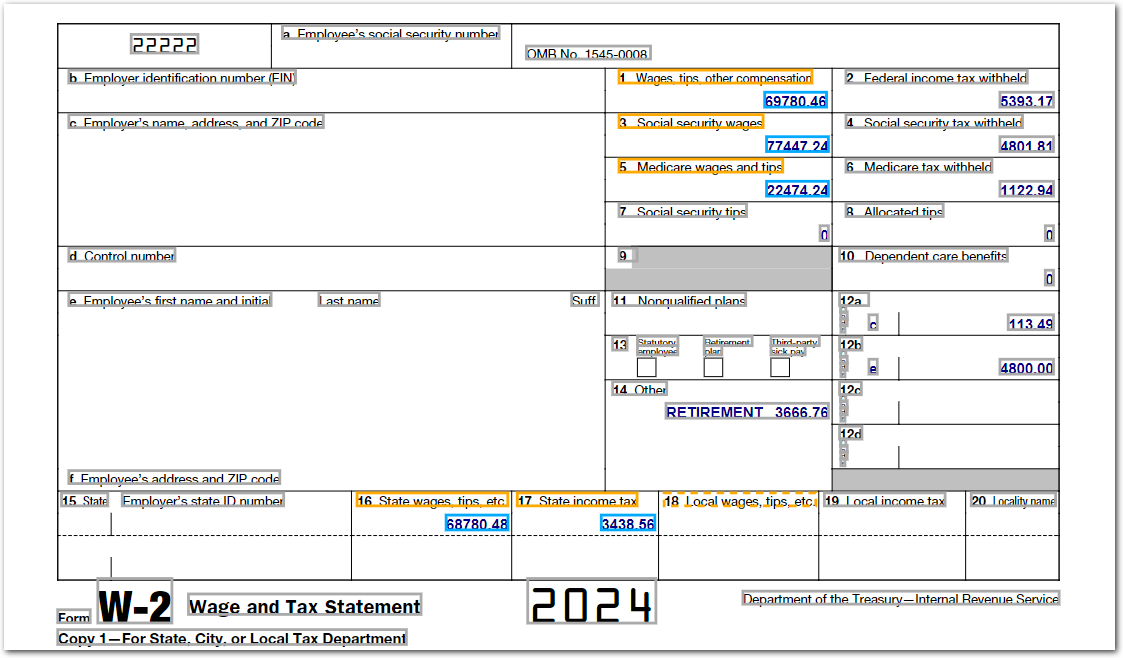
| Example document | Download link |
|---|
Output
// POSTPROCESSED OUTPUT

{
  "tax_summary": {
    "sent_by": "sensible-api",
    "state_info": {
      "state_tax": 3438.56,
      "state_wages": 68780.48
    },
    "wage_entries": [
      69780.46,
      77447.24,
      22474.24,
      68780.48
    ]
  }
}

// PARSED DOCUMENT OUTPUT

{
  "state_wages": {
    "source": "68780.48",
    "value": 68780.48,
    "unit": "$",
    "type": "currency"
  },
  "state_tax": {
    "source": "3438.56",
    "value": 3438.56,
    "unit": "$",
    "type": "currency"
  },
  "all_wage_fields": [
    {
      "source": "69780.46",
      "value": 69780.46,
      "unit": "$",
      "type": "currency"
    },
    {
      "source": "77447.24",
      "value": 77447.24,
      "unit": "$",
      "type": "currency"
    },
    {
      "source": "22474.24",
      "value": 22474.24,
      "unit": "$",
      "type": "currency"
    },
    {
      "source": "68780.48",
      "value": 68780.48,
      "unit": "$",
      "type": "currency"
    }
  ]
}
Updated 26 days ago